如何构建可访问互联网的 OpenAI 助理

OpenAI 再次通过一次开创性的开发者日(DevDay)展示了其工具、产品和服务套件的最新改进,震撼全场。其中一个重要发布是全新的Assistants API,它使开发者能更轻松地构建自己的、有目标且能调用模型和工具的辅助 AI 应用。
新的 Assistants API 目前支持三种类型的工具:代码解释器(Code Interpreter)、检索(Retrieval)和函数调用(Function calling)。尽管您可能期望检索工具支持在线信息检索(例如搜索 API 或像 ChatGPT 插件那样的功能),但它目前仅支持原始数据文件,如文本或 CSV 文件。
本博客将演示如何利用最新的 Assistants API 和函数调用工具来获取在线信息。
如果想跳过下面的教程,可以直接查看完整的 Github Gist。
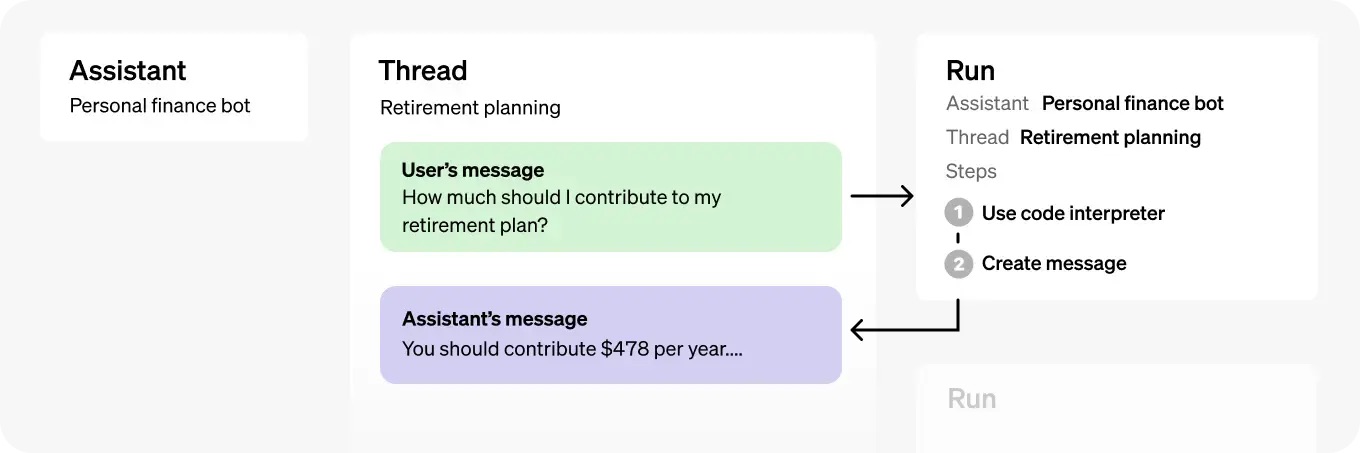
从高层次来看,一次典型的 Assistants API 集成包含以下步骤:
- 通过定义其自定义指令和选择一个模型,在 API 中创建一个助手(Assistant)。如果需要,可以启用代码解释器、检索和函数调用等工具。
- 当用户开始对话时,创建一个对话线程(Thread)。
- 随着用户提问,向对话线程中添加消息(Message)。
- 在对话线程上运行(Run)助手以触发响应。这将自动调用相关工具。
如下所示,一个助手对象包含用于存储和处理助手与用户之间对话会话的对话线程(Threads),以及用于在对话线程上调用助手的运行(Run)。
让我们一步步实现这些步骤!在本例中,我们将构建一个能够就金融问题提供见解的金融 GPT。我们将使用 OpenAI Python SDK v1.2 和 Tavily 搜索 API。
首先,我们来定义助手的指令:
assistant_prompt_instruction = """You are a finance expert.
Your goal is to provide answers based on information from the internet.
You must use the provided Tavily search API function to find relevant online information.
You should never use your own knowledge to answer questions.
Please include relevant url sources in the end of your answers.
"""
接下来,我们来完成第一步,使用最新的 GPT-4 Turbo 模型(128K 上下文)创建一个助手,并使用 Tavily 网页搜索 API 定义函数调用:
# Create an assistant
assistant = client.beta.assistants.create(
    instructions=assistant_prompt_instruction,
    model="gpt-4-1106-preview",
    tools=[{
        "type": "function",
        "function": {
            "name": "tavily_search",
            "description": "Get information on recent events from the web.",
            "parameters": {
                "type": "object",
                "properties": {
                    "query": {"type": "string", "description": "The search query to use. For example: 'Latest news on Nvidia stock performance'"},
                },
                "required": ["query"]
            }
        }
    }]
)
第2步和第3步非常直接,我们将启动一个新的对话线程,并用一条用户消息来更新它。
thread = client.beta.threads.create()
user_input = input("You: ")
message = client.beta.threads.messages.create(
    thread_id=thread.id,
    role="user",
    content=user_input,
)
最后,我们将在对话线程上运行助手,以触发函数调用并获取响应。
run = client.beta.threads.runs.create(
    thread_id=thread.id,
    assistant_id=assistant_id,
)
到目前为止一切顺利!但从这里开始事情变得有点复杂。与常规的 GPT API 不同,Assistants API 不会返回同步响应,而是返回一个状态。这允许在不同助手中进行异步操作,但也需要更多的开销来获取状态并手动处理每一种情况。

为了管理这个状态生命周期,让我们构建一个可复用的函数来处理等待各种状态(例如‘requires_action’)的情况。
# Function to wait for a run to complete
def wait_for_run_completion(thread_id, run_id):
    while True:
        time.sleep(1)
        run = client.beta.threads.runs.retrieve(thread_id=thread_id, run_id=run_id)
        print(f"Current run status: {run.status}")
        if run.status in ['completed', 'failed', 'requires_action']:
            return run
只要运行尚未最终完成(例如,状态为已完成或需要函数调用操作),此函数就会休眠。
我们快要完成了!最后,让我们来处理助手想要调用网页搜索 API 的情况。
# Function to handle tool output submission
def submit_tool_outputs(thread_id, run_id, tools_to_call):
    tool_output_array = []
    for tool in tools_to_call:
        output = None
        tool_call_id = tool.id
        function_name = tool.function.name
        function_args = tool.function.arguments

        if function_name == "tavily_search":
            output = tavily_search(query=json.loads(function_args)["query"])

        if output:
            tool_output_array.append({"tool_call_id": tool_call_id, "output": output})

    return client.beta.threads.runs.submit_tool_outputs(
        thread_id=thread_id,
        run_id=run_id,
        tool_outputs=tool_output_array
    )
如上所示,如果助手判断应该触发函数调用,我们会提取所需的函数参数,并将其传回可运行的线程。我们捕捉到这个状态,并如下所示调用我们的函数:
if run.status == 'requires_action':
    run = submit_tool_outputs(thread.id, run.id, run.required_action.submit_tool_outputs.tool_calls)
    run = wait_for_run_completion(thread.id, run.id)
就这样!我们现在拥有一个可以工作的 OpenAI 助手,它能利用实时的在线信息来回答金融问题。以下是完整的可运行代码:
import os
import json
import time
from openai import OpenAI
from tavily import TavilyClient

# Initialize clients with API keys
client = OpenAI(api_key=os.environ["OPENAI_API_KEY"])
tavily_client = TavilyClient(api_key=os.environ["TAVILY_API_KEY"])

assistant_prompt_instruction = """You are a finance expert.
Your goal is to provide answers based on information from the internet.
You must use the provided Tavily search API function to find relevant online information.
You should never use your own knowledge to answer questions.
Please include relevant url sources in the end of your answers.
"""

# Function to perform a Tavily search
def tavily_search(query):
    search_result = tavily_client.get_search_context(query, search_depth="advanced", max_tokens=8000)
    return search_result

# Function to wait for a run to complete
def wait_for_run_completion(thread_id, run_id):
    while True:
        time.sleep(1)
        run = client.beta.threads.runs.retrieve(thread_id=thread_id, run_id=run_id)
        print(f"Current run status: {run.status}")
        if run.status in ['completed', 'failed', 'requires_action']:
            return run

# Function to handle tool output submission
def submit_tool_outputs(thread_id, run_id, tools_to_call):
    tool_output_array = []
    for tool in tools_to_call:
        output = None
        tool_call_id = tool.id
        function_name = tool.function.name
        function_args = tool.function.arguments

        if function_name == "tavily_search":
            output = tavily_search(query=json.loads(function_args)["query"])

        if output:
            tool_output_array.append({"tool_call_id": tool_call_id, "output": output})

    return client.beta.threads.runs.submit_tool_outputs(
        thread_id=thread_id,
        run_id=run_id,
        tool_outputs=tool_output_array
    )

# Function to print messages from a thread
def print_messages_from_thread(thread_id):
    messages = client.beta.threads.messages.list(thread_id=thread_id)
    for msg in messages:
        print(f"{msg.role}: {msg.content[0].text.value}")

# Create an assistant
assistant = client.beta.assistants.create(
    instructions=assistant_prompt_instruction,
    model="gpt-4-1106-preview",
    tools=[{
        "type": "function",
        "function": {
            "name": "tavily_search",
            "description": "Get information on recent events from the web.",
            "parameters": {
                "type": "object",
                "properties": {
                    "query": {"type": "string", "description": "The search query to use. For example: 'Latest news on Nvidia stock performance'"},
                },
                "required": ["query"]
            }
        }
    }]
)
assistant_id = assistant.id
print(f"Assistant ID: {assistant_id}")

# Create a thread
thread = client.beta.threads.create()
print(f"Thread: {thread}")

# Ongoing conversation loop
while True:
    user_input = input("You: ")
    if user_input.lower() == 'exit':
        break

    # Create a message
    message = client.beta.threads.messages.create(
        thread_id=thread.id,
        role="user",
        content=user_input,
    )

    # Create a run
    run = client.beta.threads.runs.create(
        thread_id=thread.id,
        assistant_id=assistant_id,
    )
    print(f"Run ID: {run.id}")

    # Wait for run to complete
    run = wait_for_run_completion(thread.id, run.id)

    if run.status == 'failed':
        print(run.error)
        continue
    elif run.status == 'requires_action':
        run = submit_tool_outputs(thread.id, run.id, run.required_action.submit_tool_outputs.tool_calls)
        run = wait_for_run_completion(thread.id, run.id)

    # Print messages from the thread
    print_messages_from_thread(thread.id)
这个助手可以通过使用额外的检索信息、OpenAI 的代码解释器等功能进行进一步的定制和改进。此外,您还可以添加更多的函数工具,让助手变得更智能。
如果您有任何其他问题,请随时在下方留言!